Icon of program: autoclose

autoclose for Windows

  • Free
  • 3.9
    8
  • 7.2K
  • V2.0
Free Download for Windows

View an ad to download for free

Automatically turn off your PC

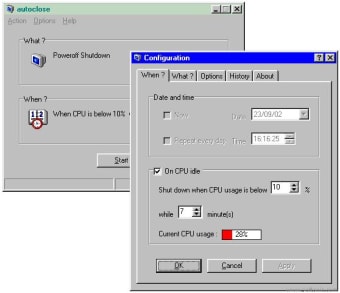
One way to preserve the life of your PC is to make sure it's not switched on all the time. But what happens if you want to leave it downloading overnight? Autoclose is a small utility that allows you to shut down Windows automatically at any time specified by you.

Top Recommended Alternative

You can shut down the system at a certain time or you can shut down when the CPU usage reaches certain levels. It works slightly differently under different operating systems however. Under Win95 and Win98, you'll be able make your system shutdown (and poweroff), log off, hibernate or reboot. However, under WinNT/Win2000, you can make your system shutdown (i.e. to safe to switch off screen, poweroff, log off, hibernate or reboot.)

One particularly useful feature is The Force Close option which assures you that the system will be shut down, no matter what processes are activated in your system. However, be careful with this because you may lose any unsaved data when this kicks in. This is a very simple program to use although be careful how you configure it as it can take over your whole system and shut you down just when you least expect it.


  • Pros

    • Allows you to conserve your PC's energy and CPU
    • Easy to configure
  • Cons

    • Could result in loss of data if shuts down too quickly
 0/1

App specs

  • Developer

  • License

    Free

  • Version

    2.0

  • Latest update

  • Platform

    Windows

  • OS

    Windows 2000

  • Language

    English

  • Downloads

    7.2K

  • Size

    242.03 KB

Program available in other languages


Icon of program: autoclose

autoclose for PC

  • Free
  • 3.9
    8
  • 7.2K
  • V2.0
Free Download for PC

View an ad to download for free


User reviews about autoclose

Have you tried autoclose? Be the first to leave your opinion!

Add review

You may also like

Explore Apps

Latest articles

Laws concerning the use of this software vary from country to country. We do not encourage or condone the use of this program if it is in violation of these laws.
Softonic

Is autoclose safe?

Score result: Clean

This file passed a comprehensive security scan using VirusTotal technology. It is safe to download.

  • Virus free
  • Spyware free
  • Malware free
  • Verified by Security Partners

    VirusTotal logo

Scan Info

Last scan
Wednesday, December 2, 2020
Scan provider
VirusTotal

Softonic security commitment

autoclose has been thoroughly scanned by our advanced security systems and verified by industry-leading partners. This file comes from the official developer and has passed all our security checks, showing no signs of viruses, malware, or spyware. For more information, visit our Security and Trust Center

Signed in to Softonic as